A Simple WebSocket Echo Server
It's time to learn WebSocket protocol by scratching a simple echo server after reading Writing WebSocket Servers.
An overview to the WebScoekt protocol, WebSocket is upon the TCP protocol, it is a replacement to polling when we want to do some real-time works on Web, just like Socket. And like TCP protocol, WebSocket needs to handshake first then communicate with each other, client and server. During communication, either client or server can send data or close the connection at any time.
Handshake
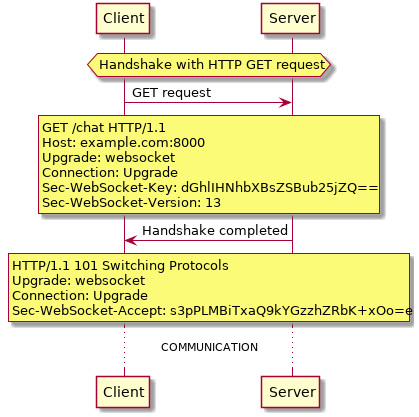
The request from above is very standard, it is OK to add headers like "User-Agent", "Refere", "Cookie". If any header is not understood or with an incorrect value, then server should send a "400 Bad Request" and close the socket immediately.
If server does not understand the "Sec-WebSocket-Version" from the client, then server should tell client that which version it supports by sending "Sec-WebSocket-Version" back.
As for "Sec-WebSocket-Accept" header, server must derive it from "Sec-WebSocket-Key" that client sent, concatenating client's Sec-WebSocket-Key and "258EAFA5-E914-47DA-95CA-C5AB0DC85B11" together, then take the SHA-1 hash of the result and return the base64 encoding of the hash. If the values of "Sec-WebSocket-Accept" and "Sec-WebSocket-Key" are right, then we can start swapping data.
When constructing response, remember each header ends with \r\n and put an extra \r\n after the last one, or it will raise a error like: "WebSocket connection to 'ws://xxxxxx/' failed: Invalid frame header".
Communication
Data Frame Format
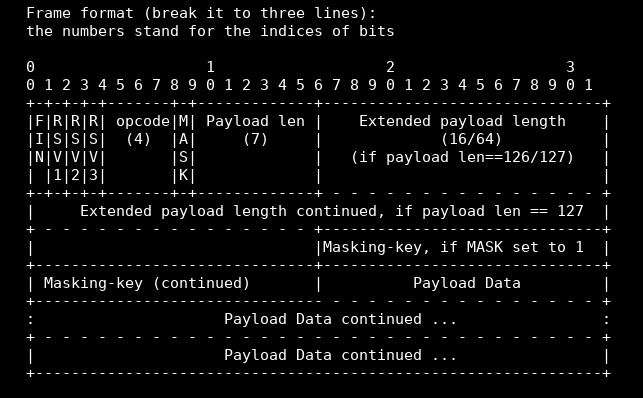
Exchanging Data Frames requires to extract information from these frames, now let's read (or decode) the fields one by one and step by step:
- FIN field (1 bit) tells the whether it is the last message in a series:
- 0x0, server will keep listening
- 0x9 and 0xA, ping and pong frames, control frames
- 0x9 is for pings
- 0xA is for pongs, a pong should be sent with same Payload data of a ping after receiving the ping
- for pings and pongs, the max payload length is 125
- ignore a pong without ever sending a ping; send only one pong if have gotten more than one ping before get the chance to send a pong
- others, server will consider the message delivered, that is time to close the connection.
- RSV1-3 fields (3 bits) for extensions can be ignore.
- opcode field (4 bits) defines how to interpret payload data:
- 0x0 for continuation, that suggests the message had been split up before it was sent.
- 0x1 for text, 0x2 for binary
- the others have no meaning.
- MASK field (1 bit) tells whether the message is encoded. Server excepts it to be 1, and disconnect from the client if the message is not encoded. When sending a frame back to the client, don't mask it and don't set the bit.
- Payload len field tells the length of payload so that server can know when to stop while extracting
payload data. Decoding payload length follow 3 steps:
- Read bits 9-15 (inclusive) and interpret that as an unsigned integer. If it's 125 or less, then that's the length; you're done. If it's 126, go to step 2. If it's 127, go to step 3.
- Read the next 16 bits (2 bytes) and interpret those as an unsigned integer. You're done.
- Read the next 64 bits (8 bytes )and interpret those as an unsigned integer (The most significant bit MUST be 0). You're done.
Masking-key field (32 bits or 4 bytes) needs to be read if the MASK field was set (and it should be). We will need it to decode (or unmasking) the encoded data that is payload data field. The way to decode should look like
#! /usr/bin/env python3
decoded_data = []
for i in range(len(encoded_data)):
    decoded_data.append(encoded_data[i] ^ masking_key[i % 4])
- Payload data field is the data exchanged. If MASK was set, it has to be decoded with masking key.
- FIN field (1 bit) tells the whether it is the last message in a series:
Let's code
Now that we have known how WebSocket handshakes and communicates, it is about time to code to help us to understand WebSocket. The plan is to build a echo server with socketserver module and to en/decode the frame with struct module, this websocket server is an echo server, that is, server responses what client sent.
If you have not used socketserver and struct module before, please glance at this one and this one.
I write some comments to try to make you understand easier. If you want to download the file, please check it out on Github, and give me a star to let me know this article do help you.
#! /usr/bin/env python3
# echo_server.py
import argparse
import base64
import hashlib
import socketserver
import struct

MAGIC_STRING = b"258EAFA5-E914-47DA-95CA-C5AB0DC85B11"

RSP_TO_BAD_REQ = (
    b"HTTP/1.1 400 Bad Request\r\n"
    b"Content-Type: text/plain\r\n"
    b"Connection: close\r\n"
    b"\r\n"
    b"Incorrect request"
)

RSP_TO_COMPLETE_HANDSHAKE = (
    b"HTTP/1.1 101 Switching Protocols\r\n"
    b"Upgrade: websocket\r\n"
    b"Connection: Upgrade\r\n"
    b"Sec-WebSocket-Accept: %s\r\n\r\n")


class EchoRequestHandler(socketserver.BaseRequestHandler):
    def handle(self):
        """
        The plan:
            1. handshake
            2. if handshake successfully, then start to swap message,
               to swap message, do it in two parts: extract payload
               and send message back.
            3. if handshake failed, tell client that "Bad Request"
        """
        is_handshake_completed = self.handshake()
        if is_handshake_completed:
            while True:
                (
                    fin_and_opcode,
                    payload_len_indicator,
                    payload_len,
                    decoded_payload
                ) = self.extract_payload(self.request.recv(1024).strip())
                self.send_back(fin_and_opcode, payload_len_indicator,
                               payload_len, decoded_payload)

    def handshake(self):
        """
        The plan:
            1. handshake with HTTP GET request
            2. only consider "Connection", "Upgrade" and "Sec-WebSocket-Key"
               headers in this example.
            3. calculate Sec-WebSocket-Accept to send to the client
            4. return True for successful or False for failed to determine
               whether to swap data
        """
        _headers = self.request.recv(1024).strip().split(b"\r\n")
        headers = {}
        for h in _headers:
            try:
                key, value = h.split(b":")
            except ValueError:
                # ignore lines like "GET / HTTP/1.1"
                continue
            headers[key.strip(b" ")] = value.strip(b" ")
        if headers.get(b"Connection") == b"Upgrade" and \
           headers.get(b"Upgrade") == b"websocket":
            sec_websocket_key = headers.get(b"Sec-WebSocket-Key")
            if not sec_websocket_key:
                return False
            # to calcuate Sec-WebSocket-Accept
            sec_websocket_key += MAGIC_STRING
            sec_websocket_key = base64.standard_b64encode(
                hashlib.sha1(sec_websocket_key).digest())
            # no problem now, then complete the handshake
            self.request.sendall(
                RSP_TO_COMPLETE_HANDSHAKE % sec_websocket_key)
            # staring to swap data and to decode the frame
            return True
        else:
            self.request.sendall(RSP_TO_BAD_REQ)
            return False

    def extract_payload(self, frame):
        """
        One thing important is: the frame from the client is
        a bytes or bytearray and every byte equals to 8 bits.
        When we begin to extract fields from frame, this thing
        and data frame format will be the key to let us understand
        how to decode frame.

        When decoding, we need to think about what we will need to
        construct a frame to send back.

        The fields we will need to construct a frame are FIN and opcode,
        payload len, decoded payload and payload len indicator which tells
        us how to get payload len.

        Once we knew that, it is time to decode frame.
        """
        # the first byte stores FIN field and opcode field.
        # the second byte stores MASK field and payload_len indicator
        fin_and_opcode = frame[0]
        payload_len_indicator = frame[1] - 128
        # extract payload_len according to payload_len_indicator
        if payload_len_indicator <= 125:
            # the frame use 7 bits to store payload_len
            payload_len = payload_len_indicator
            mask_key = frame[2:6]
            mask_key_end = 6
        elif payload_len_indicator == 126:
            # the frames use 2 bytes to store payload_len
            payload_len = struct.unpack_from("!H", frame[2:4])[0]
            mask_key = frame[4:8]
            mask_key_end = 8
        else:
            # the frame uses 8 bytes to store payload_len
            payload_len = struct.unpack_from("!Q", frame[2:10])[0]
            mask_key = frame[10:14]
            mask_key_end = 14
        encrypted_payload = frame[
            mask_key_end: mask_key_end+payload_len]
        decoded_payload = bytearray(
            [
                encrypted_payload[i] ^ mask_key[i % 4]
                for i in range(payload_len)
            ])
        return (fin_and_opcode, payload_len_indicator,
                payload_len, decoded_payload)

    def send_back(self, fin_and_opcode, payload_len_indicator,
                  payload_len, decoded_payload):
        """
        To send back, we need to learn 3 things:
        1. the frame to send back whose mask field MUST not be set to 1;
        2. not consider the situation that message fragmentation here
        3. how to construct a frame manually
        """
        decoded_payload = decoded_payload
        if payload_len_indicator <= 125:
            # when payload_len_indicator <= 125,
            # the length of payload is payload_len_indicator
            frame = bytearray(
                [fin_and_opcode, payload_len]) + decoded_payload
        elif payload_len_indicator == 126:
            # unlike that the payload_len_indicator <= 125,
            # in this case, it is necessary to store payload_len
            # in other bytes, as well as payload_len_indicator is 127
            frame = bytearray(
                [fin_and_opcode, payload_len_indicator]) + \
                struct.pack("!H", payload_len) + decoded_payload
        else:
            frame = bytearray(
                [fin_and_opcode, payload_len_indicator]) + \
                struct.pack("!Q", payload_len) + decoded_payload
        self.request.sendall(frame)


if __name__ == "__main__":
    parser = argparse.ArgumentParser(
        description="Kick off a echo websocket server")
    parser.add_argument('host', help='IP or hostname')
    parser.add_argument('-p', help='Port (default=8001)',
                        metavar='port', type=int, default=8001)
    args = parser.parse_args()
    HOST, PORT = args.host, args.p
    socketserver.TCPServer.allow_reuse_address = True
    server = socketserver.TCPServer((HOST, PORT), EchoRequestHandler)
    server.serve_forever()
Time to try it out. To make it quickly, you better have a Chrome browser, I got a "Content Security Policy" problem in Firefox, but it was fine in Chrome. There is no any other browser on my computer, so I don't know other browsers.
Kick off your echo server with
python3 echo_server.py ''
Then fire up your Chrome console, and input these statements
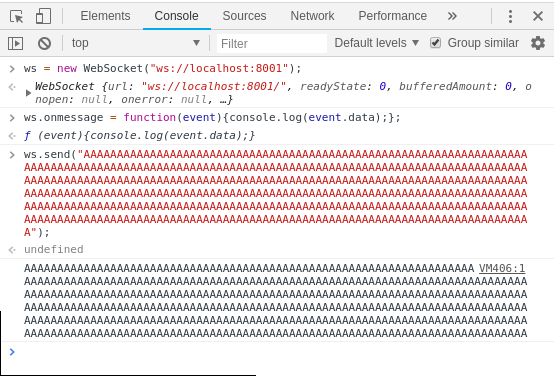
Don't panic! Building a websocket server like this is not a fantasy experience. Fortunately, there are many tools can help you build a websocket server easily and quickly. One of them is the well-known Tornado. I am learning how to use Tornado these day. It's a simple and powerful framework, I will write an article about my experience of learning Tornado another days, of course, not for websocket. :).
What is missing? There are 3 things are missing. If you like adventures, I recommend you to do complete these.
- data fragmentation and processing
- processing of pings and pongs
- cross-site checking