Regex
Table of Contents
Well, if you always forget somethings, then you should take notes for you to remember them easily. Regex, regular expression, is such a powerful tool that I always forget how to use it frequently. It is powerful but not overwhelming, so if take it as your daily need, then there is no need to take notes. For me, I would rather take notes in beginning, and now it is in it.
I have learned regex in spare time for a long time, as what I mentioned before, easy to forget it. So, I decide to simplify the information from the book, "Mastering Regular Expressions". Every regex tool is difference, so you need to read the manual of the tool you are using carefully. Though they still are similar, I think it will be helpful for you to make some concepts of regex more clear.
Metacharacters
Start and End of the Line
- beginning-of-line: ^
- end-of-line: $
Character Classes
- [0-9A-ZR!.?], etc., matches one of the characters it lists in [], the dash will is the metacharater here, if it is the first character in the character class, then it is not. Besides the dash, every characters in a [] are literal characters.
Negated Character classes
- [^…], match characters not in the characters following ^, ^ in the character classes means negated.
Matching Any Character with Dot
- . is a shorthand for a character class that matches any character.
Matching any one of several subexpressions, Alternation
- (exp1|exp2|exp3|…), matches one of them
- differentiating from the character class, the metacharacters in it are still metacharacters.
Word Boundaries
- \<a\> or \ba\b, matches a that is a single word.
Quantifiers
- a*: 0 or more a
- a+: 1 or more a
- a?: 0 or 1 a, or a is optional
- a{3,13}: matches up to 12 times if possible, but settles for three.
Parentheses and Backreferences
- \b(t.*e)\b \1, for example, if the string is "the the", then match, \1 refers to what (t.*e)
matches, so "the tae" does not match. \n, n refers the nth matched string.
The Great Escape
- \metacharacter has metacharacter became a literal character
Regex Modes and Match Modes
Case-insensitive match mode
- ignores the case
Free-spacing and comments regex mode
- whitespace outside the character classes are mostly ignored.
Dot-matches-all match mode (a.k.a., "single-line mode")
- dot usually does not match a newline, but it does in single-line mode
Enhanced line-anchor match mode (a.k.a., "multiline mode")
- ^ treats the string as multiple logical lines if the string contains in the middle, same for $, $ will may be more complex. For example, in multiline mode "^.*$" or ".*" matches "" of "\nb".
Literal-text regex mode
- it does not recognize most of or all regex metacharacters.
Some Features
Lookaround
- lookhead (?=…) and (?!…), (?=abc) means the position at the start of "abc", (?!abc) means the position at the start of string that is not "abc".
- lookbehind (?<=…) and (?<!…), (?<=abc) means the position at the end of "abc", (?<!abc) means the position at the string that is not "abc".
Grouping, Capturing, Conditionals, and Control
- capturing/grouping parentheses: (…), \1, \2, …
- grouping-only parentheses: (?:…)
- named capture: (?<Name>…)
- atomic grouping: (?>…)
- alternation: …|…|…
- conditional: (? if then | else), three parts if, then and else.
- greedy quantifiers: *, +, ?, {min,max}
- lazy quantifiers: *?, +?, ??, {min,max}?
- possessive quantifiers: *+,++,?+,{min,max}+
Concepts
This is the most important part for me, it told me how the regex engine match, once understand this, there will be no problems to craft regular expression anymore (after practicing enough of course). It covers what "greedy" and "lazy" means, what types of regex engine, what "backtrack" is and how it does.
Regex Engine Types
- DFA (awk, egrep, flex, lex, MySQL, Procmail)
- Traditional NFA (Emacs, Java, grep, less, more, .NET languages, PCRE library, Perl, PHP, Python, Ruby, sed, vi
- POSIX NFA (mawk, Mortice Kern Systems' utilities, Emacs (when requested)
- Hybrid NFA/DFA (GNU awk, GNU grep/egrep, Tcl)
Regex-Directed Versus Text-Directed
NFA Engine (Nondeterministic Finite Automaton): Regex-Directed.
For example, match "to(nite|knight|night)" against "..tonight..", the first one is "t", which repeatelly fails until a "t" is reached in the target string. Once that happens, the "o" is checked against the next character, and if it matches, control moves to the next component, (nite|knight|night), which means "nite" or "knight" or "night", engine tries each in turn. Attempting the first alternative, "nite", recurs the matching behavior as before. If this fails, as it eventually does, the engine tries another alternative, and so on until it achieves a match or must report failure.
DFA Engine (Deterministic Finite Automaton): Text-Directed
Contrast the regex-directed NFA engine with an engine that, while scanning the string, keeps track of of the matches "currently in the work." In the "tonight" example, the moment the engine hits "t", it adds a potential match to its list of those currently in progress:
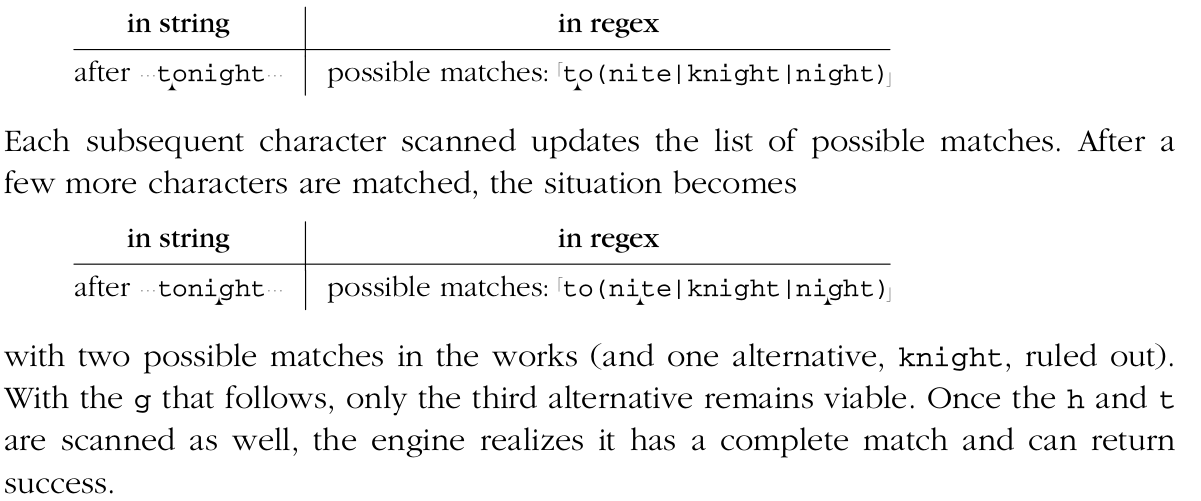
Backtracking, the Essence of an NFA Engine
- There is about the decision between "make an attempt" and "skip an attempt", as with governed by quantifier, the engine always chooses to first make the attempt for greedy quantifiers, and to first skip the attempt for lazy (non-greedy) ones.
The most recently saved option is the one returned to when a local failure forces backtracking. Last in first out. Saved option also called saved states, which indicates where matching can restart from, reflects both the position in regex and the point in the string where an untried option begins. If it matches then creates and save the state and go on, restart from the last state it saved otherwise, that is what we call Backtracking.
A state looks like this:

About the Use of Regex
Written on 2018/9/2
Here is an answer about Regex and HTML, in short, Regex is not a tool to parse HTML. HTML is not
the regular language but a structured language. Parser does that job, programming language as well.